 GymTrack
How to Track Progressive Overload in Your Workouts
October 28, 2026 · 25 min read
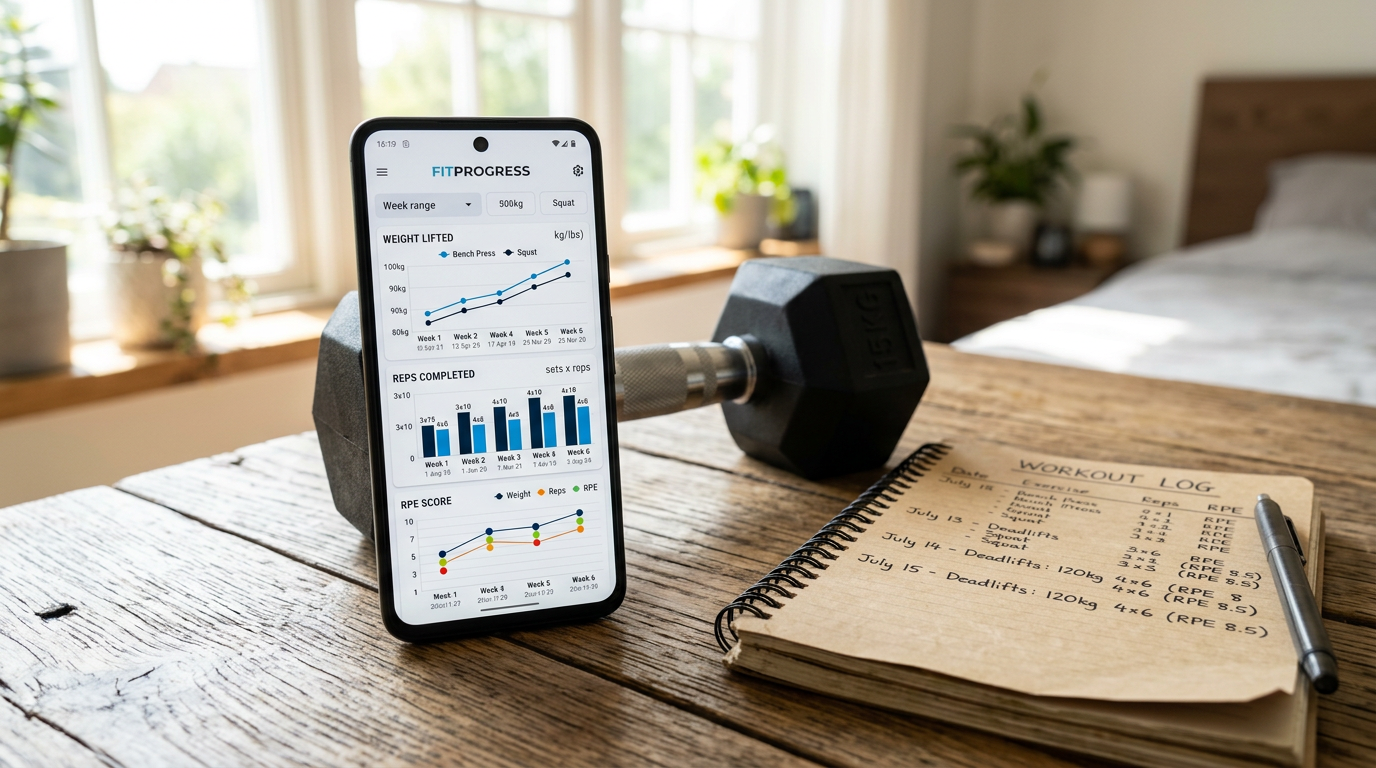
How to Track Progressive Overload in Your Workouts
Progressive overload tracking requires logging weight, reps, sets, and intensity (RPE or RIR) for each exercise across sessions, then comparing performance week-to-week to ensure measurable increases in volume, load, or effort that drive strength adaptation.
You added 10 pounds to your squat last month. This month you stalled. Next week you might regress.
Without a system to track progressive overload, you're guessing whether you're actually getting stronger or just spinning your wheels in the gym. How to track progressive overload comes down to recording the right metrics and comparing them across training cycles to confirm you're applying progressive stimulus.
Most lifters track some data but miss the context that makes it useful. They log sets and reps but forget RPE. They record today's workout but never compare it to three weeks ago. They chase arbitrary numbers without a plan.
This guide covers the specific metrics you need to log, the tools that make tracking fast, and the analysis methods that show whether your training is working. You'll learn how to track progressive overload using workout apps, spreadsheets, or notebooks, and how to interpret your data to make better programming decisions.
Key Takeaways
- Track weight, reps, sets, and RPE/RIR for every working set to capture complete overload data
- Compare total volume (sets × reps × weight) across mesocycles to confirm progressive stimulus
- Use workout tracking apps with automatic PR detection and per-set targets for faster logging
- Review training data every 4-6 weeks to identify stalls and adjust programming
- Focus on beating previous comparable sessions, not arbitrary weight increases
What You'll Need to Track Progressive Overload
Before you start logging workouts, you need a method that captures the right data without slowing down your training. The minimum viable tracking system includes these components.
Essential Tracking Tools
You have three main options: dedicated workout apps, spreadsheets, or physical notebooks. Workout tracking apps like GymTrack, Strong, Hevy, and Boostcamp offer the fastest logging with automatic calculations and historical comparisons. Spreadsheets give you full control but require manual setup. Notebooks work but make trend analysis harder.
For app-based tracking, look for these features:
- Fast set entry (log weight, reps, and RPE in under 5 seconds per set)
- Automatic PR detection across rep ranges
- Historical workout comparison (see what you lifted last time you did this exercise)
- Volume calculations (total tonnage per session or per muscle group)
- Rest timers and plate calculators to keep workouts moving
- Program templates with per-set targets if you follow structured training
GymTrack handles all of this with automatic 1RM projections and an AI coach that reads your training history. Strong and Hevy are solid alternatives with clean interfaces. Boostcamp excels at pre-built programs.
Metrics You Must Log
Progressive overload tracking fails when you log incomplete data. You need four core metrics per working set:
- Weight lifted: The actual load on the bar or machine, in pounds or kilograms
- Reps completed: Total reps performed with that weight
- Sets performed: How many work sets at this weight and rep range
- Intensity marker: RPE (Rate of Perceived Exertion, 1-10 scale) or RIR (Reps in Reserve, 0-4+ scale)
The first three give you volume load (weight × reps × sets). The fourth tells you how close to failure you trained, which determines whether adding weight or reps next session is appropriate.
Optional but useful: exercise variation (back squat vs front squat), tempo, rest periods, and training notes (felt strong, tweaked form, rushed workout).
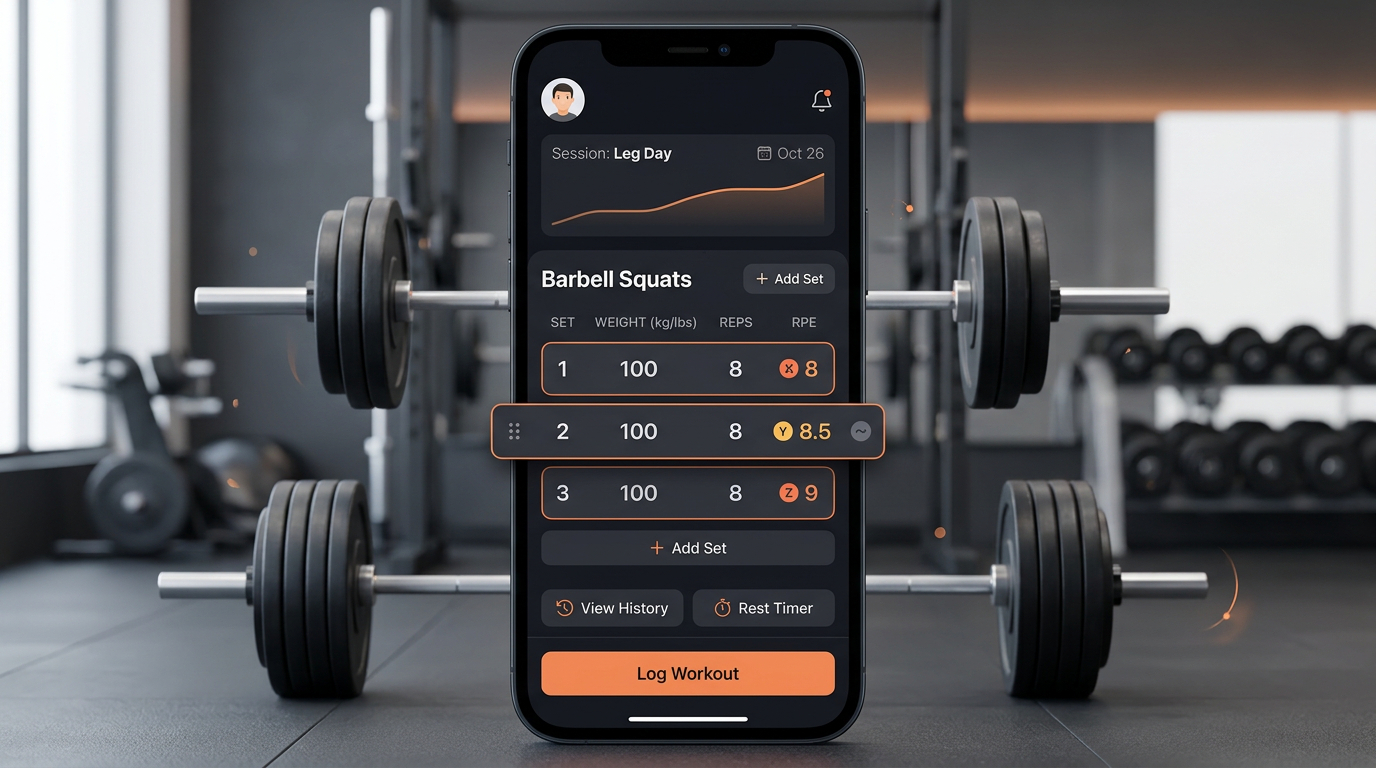
Screenshot of a workout tracking app showing a logged squat session with weight, reps, sets, and RPE clearly displayed for three working sets
Step 1: Establish Your Baseline Metrics
You can't track progress without knowing where you started. Your first training cycle should focus on collecting baseline data for your core lifts and accessories.
Test Your Starting Strength Levels
Don't max out on day one. Instead, work up to a challenging set of 5-8 reps at RPE 8 (two reps left in the tank) for each major movement. This gives you a working weight that's heavy enough to drive adaptation but light enough to accumulate volume.
Record these baseline sets for:
- Primary compound lifts (squat, bench press, deadlift, overhead press)
- Secondary compounds (front squat, incline press, Romanian deadlift, rows)
- Key accessories (lunges, dips, pull-ups, curls, lateral raises)
Log the weight, reps, and RPE. Calculate your estimated 1RM using the formula: weight × (1 + reps/30). A 225-pound squat for 8 reps estimates a 285-pound 1RM. Most tracking apps do this automatically.
Document Your Training Frequency and Split
Progressive overload depends on consistent stimulus. Note how many days per week you train each muscle group and which exercises you perform each session.
If you squat twice per week (Monday heavy, Friday volume), you need to track both sessions separately to see if you're overloading across the week. If you bench once per week, your comparison point is last week's bench session.
Pro Tip: Take photos or videos of your first working sets. Form changes affect load capacity. If you added 20 pounds but cut depth by 3 inches, you didn't actually overload the movement.
Step 2: Log Every Working Set During Your Workout
Tracking progressive overload requires real-time data entry. Trying to remember your workout after you leave the gym leads to incomplete or inaccurate logs.
Use a Fast Entry Method
The best tracking systems let you log a set in under 10 seconds. Open your app between sets, tap the exercise, enter weight and reps, optionally add RPE, and save. GymTrack and Strong both offer one-tap set copying (same weight and reps as previous set) which speeds up straight sets.
For spreadsheet users, create a template with exercise names pre-filled. During your workout, you only need to add numbers. Use your phone's spreadsheet app or bring a printed sheet and transcribe later.
Record Intensity Markers Immediately
RPE and RIR are most accurate when logged within 30 seconds of finishing a set. Your perception of difficulty changes as you recover, so waiting until the end of your workout skews your intensity data.
Use the RPE 1-10 scale:
- RPE 6-7: Could do 3-4 more reps, warmup territory
- RPE 8: Could do 2 more reps, standard working set
- RPE 9: Could do 1 more rep, hard working set
- RPE 10: Could not do another rep, absolute failure
Most effective training sits at RPE 7-9. If you're consistently logging RPE 6 or lower, you're not applying enough stimulus for progressive overload.
Note Exercise Variations and Form Changes
Back squat, front squat, and safety bar squat are different exercises. Track them separately. If you change grip width on bench press or switch from touch-and-go to paused reps, note it. These variations affect loading and make direct comparisons invalid.
When you modify form (deeper squats, stricter curls, longer range of motion), add a note so you understand why your numbers might temporarily decrease.
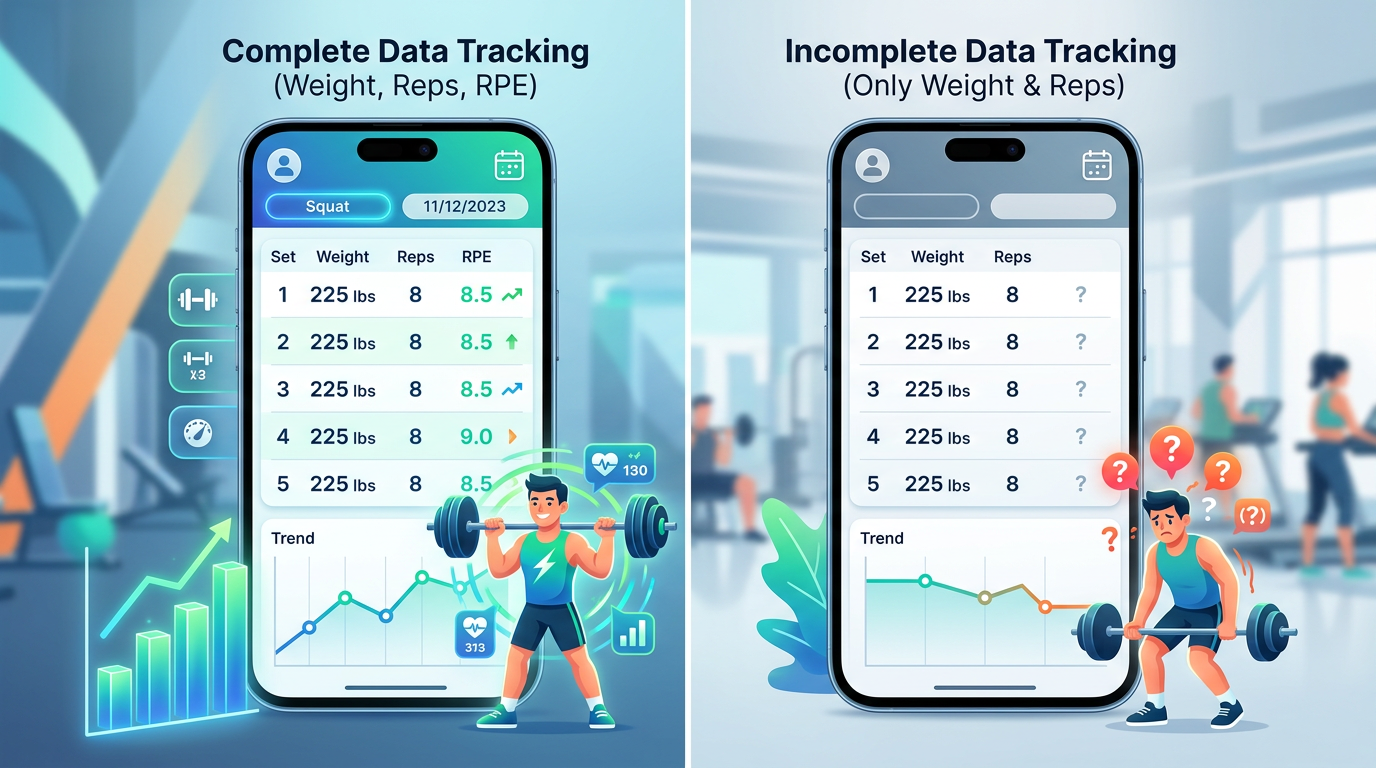
Comparison chart showing proper progressive overload tracking with complete data (weight, reps, RPE) versus incomplete tracking with only weight and reps
Step 3: Compare Performance to Previous Sessions
Logging workouts is pointless if you never analyze the data. Progressive overload requires comparing current performance to previous comparable sessions to confirm you're improving.
Identify Your Comparison Baseline
For each exercise, find the most recent session where you performed the same movement with similar rep ranges and intensity. If you squatted 3 sets of 5 at 275 pounds last week, your comparison point is that session, not a 5×10 volume day from two weeks ago.
Good workout apps show you previous performance automatically when you start an exercise. GymTrack displays your last weight, reps, and RPE right on the logging screen. Strong and Hevy offer similar features.
For spreadsheet tracking, add a column for previous session data next to your current workout. This makes comparison instant.
Calculate Volume Load Changes
Volume load is sets × reps × weight. It's the simplest measure of total work performed.
If you squatted 3 sets of 5 at 275 pounds last week (3 × 5 × 275 = 4,125 pounds), and this week you did 3 sets of 6 at 275 pounds (3 × 6 × 275 = 4,950 pounds), you added 825 pounds of volume. That's progressive overload.
You can also achieve overload by:
- Adding weight: 3×5 at 280 pounds (4,200 pounds volume, 75-pound increase)
- Adding sets: 4×5 at 275 pounds (5,500 pounds volume, 1,375-pound increase)
- Improving intensity: 3×5 at 275 pounds but dropping from RPE 9 to RPE 8 (same volume, better recovery capacity)
All three methods count as progressive overload if you're handling more total stress than before.
Look for Strength Gains Across Rep Ranges
True strength improvement shows up across multiple rep ranges, not just one. If your 1RM increased but your 10RM stayed flat, you might have just gotten better at grinding singles.
Track estimated 1RM from different rep ranges. If your calculated 1RM from a set of 5 increased and your calculated 1RM from a set of 8 also increased, you're building real strength capacity.
Most apps calculate this automatically. GymTrack projects your 1RM from every working set and flags new PRs across all rep ranges.
Pro Tip: Don't chase PRs every session. Progressive overload happens across mesocycles (4-8 weeks), not workout-to-workout. Aim to beat your performance from 4-6 weeks ago, not last week.
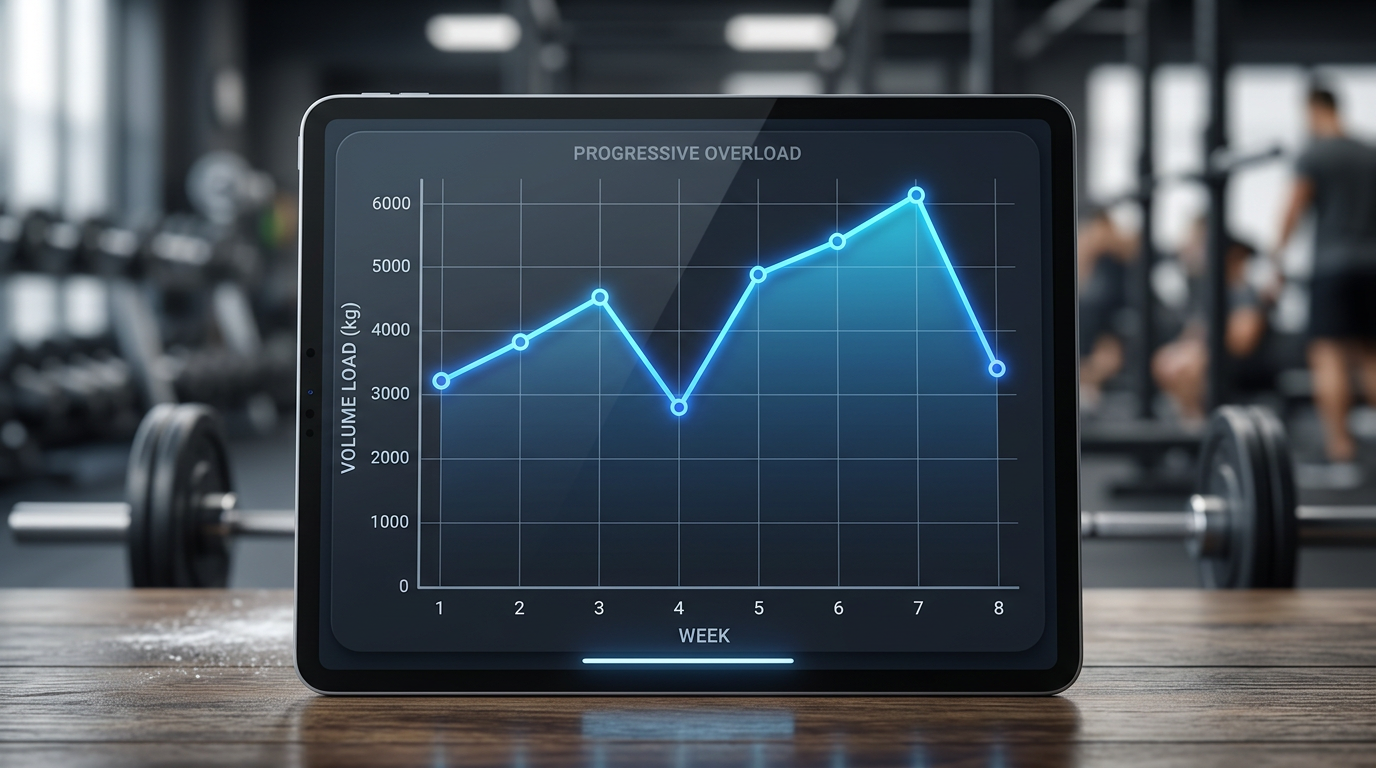
Line graph showing progressive overload over 8 weeks with volume load on Y-axis and weeks on X-axis, displaying gradual upward trend with occasional deload weeks
Step 4: Adjust Training Variables Based on Data
Tracking shows you what happened. Analysis tells you what to do next. Use your logged data to make programming decisions that keep progressive overload moving.
When to Add Weight
Add weight when you can complete all prescribed sets and reps at RPE 8 or lower for two consecutive sessions. If you hit 3 sets of 8 at 185 pounds on bench press at RPE 7-8 two weeks in a row, you're ready for 190 pounds.
For most lifters, adding 5 pounds to upper body lifts and 10 pounds to lower body lifts is sustainable. Smaller jumps (2.5 pounds upper, 5 pounds lower) work better for intermediate and advanced lifters.
If adding weight causes your reps to drop below the target range or your RPE to spike to 9-10 consistently, the jump was too big. Drop back and add reps before trying again.
When to Add Reps
If you can't add weight without form breakdown or excessive RPE, add reps instead. Work from 3×6 to 3×8, then increase weight and return to 3×6.
This double progression model keeps you in an effective hypertrophy and strength rep range (5-12 reps) while allowing for progressive overload every session.
Track your rep PRs. If you hit a new 8-rep max at 225 pounds, that's progress even if your 1RM hasn't changed.
When to Add Sets
Adding sets increases volume without requiring higher intensity. If you're stuck at 3×8 with 135 pounds on overhead press, try 4×8 or 5×8 at the same weight. The additional volume provides new stimulus.
This works best for accessories and lagging body parts. Going from 3 sets to 5 sets of lateral raises can drive shoulder growth when adding weight isn't practical.
When to Deload
If your performance stalls or regresses for 2-3 consecutive sessions, and your RPE is consistently 9-10, you need a deload. Reduce volume by 40-50 percent (cut sets or reps) or reduce intensity (drop weight by 10-15 percent) for one week.
Your tracking data makes this obvious. If your squat volume dropped from 12,000 pounds to 10,500 pounds to 9,800 pounds over three weeks despite trying to push harder, fatigue is outpacing recovery.
After a deload week, you should return to your previous performance or exceed it. If not, you need to address recovery factors (sleep, nutrition, stress) or adjust your program volume.
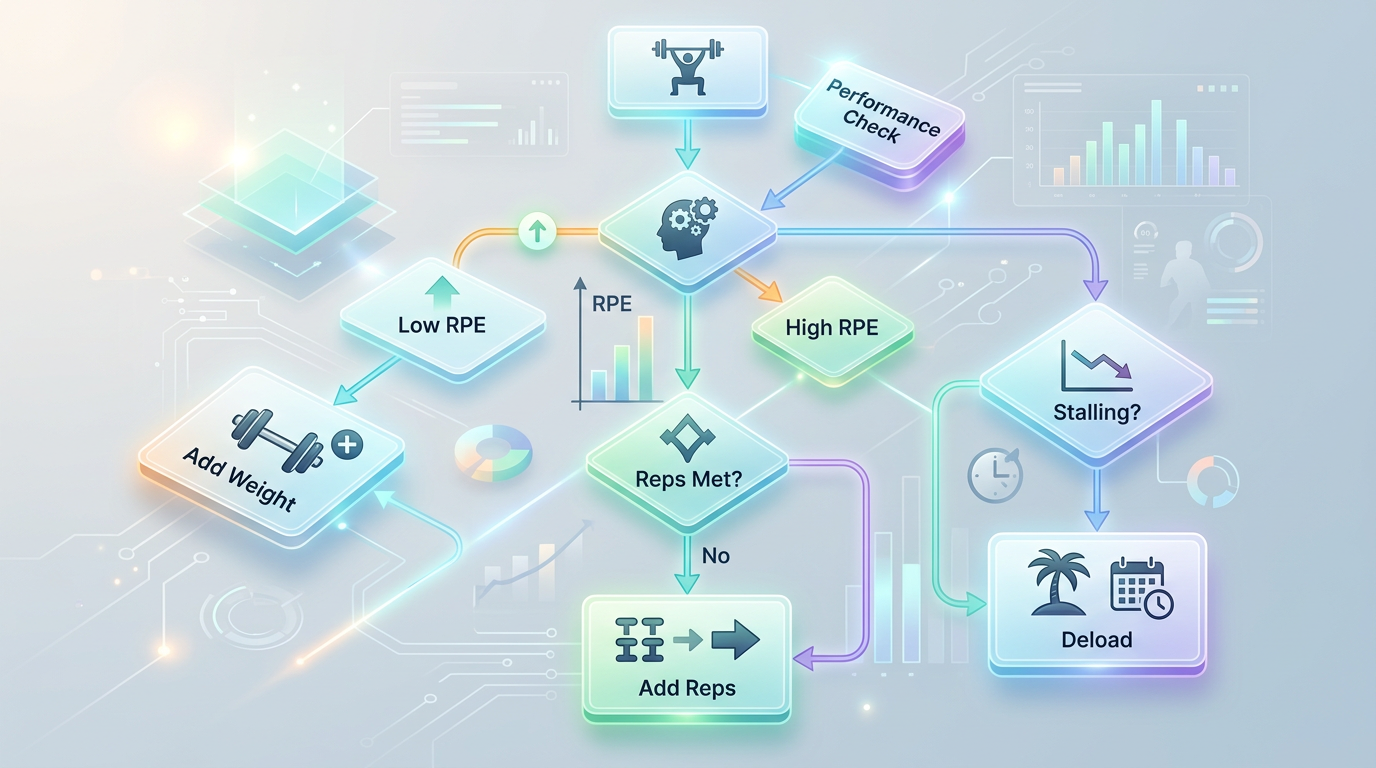
Flowchart showing decision tree for progressive overload adjustments: if RPE is low add weight, if RPE is high but reps are low add reps, if stalling for 2-3 weeks deload
Step 5: Review Long-Term Trends Every Mesocycle
Weekly fluctuations are normal. Long-term trends reveal whether your program works. Review your training data every 4-6 weeks to assess progress and plan your next training block.
Analyze Volume Progression
Calculate your total volume load per muscle group for the entire mesocycle. Did your total squat volume increase from 40,000 pounds in weeks 1-4 to 48,000 pounds in weeks 5-8? That's a 20 percent increase and clear progressive overload.
If volume stayed flat or decreased while intensity (RPE) stayed the same, you didn't overload. You maintained. That's fine for short periods but not sustainable for long-term progress.
Track Estimated 1RM Over Time
Plot your estimated 1RM for major lifts across the mesocycle. If your projected squat 1RM increased from 315 pounds to 335 pounds over 8 weeks, you built real strength even if you never tested a true max.
GymTrack graphs this automatically. For spreadsheet users, calculate e1RM weekly and chart it in Excel or Google Sheets.
Identify Weak Points and Sticking Points
Review exercises where progress stalled. If your bench press is moving but your overhead press hasn't budged in 6 weeks, your shoulders need more volume or frequency.
Look for patterns. If you always stall in week 5-6, your mesocycle might be too long. If you never hit RPE 9, you might not be training hard enough.
Plan Your Next Training Block
Use your data to set targets for the next mesocycle. If you squatted 315 pounds for 3×5 at the end of this block, aim for 325 pounds for 3×5 or 315 pounds for 3×8 by the end of the next block.
Adjust volume based on how you responded. If you made great progress on 15 sets per muscle group per week, keep it. If you stalled, try 18 sets or adjust exercise selection.
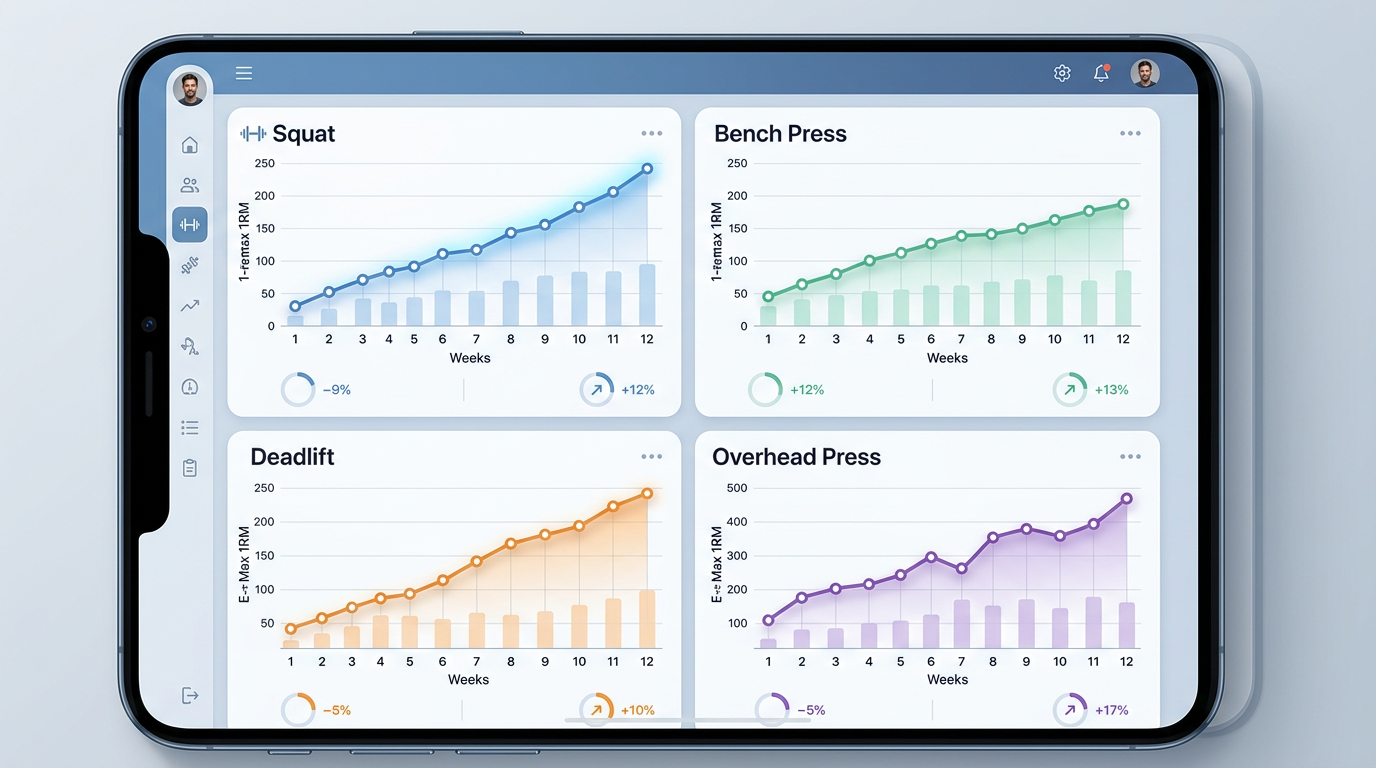
Dashboard view from a workout tracking app showing 12-week strength progression graphs for squat, bench, deadlift, and overhead press with estimated 1RM trending upward
Choosing the Right Tracking Tools
Your tracking method affects how consistently you log workouts and how easily you can analyze data. Here's what different tools offer.
Workout Tracking Apps
Apps are the fastest option for most lifters. They handle calculations automatically, show historical data during workouts, and sync across devices.
GymTrack is built for serious lifters who want fast logging, automatic PR detection, projected 1RM across all rep ranges, and an AI coach that analyzes training history to suggest adjustments. It supports structured programs with per-set targets and logs RPE by default.
Strong offers clean set logging with rest timers and plate calculators. It shows previous workout data during training and calculates volume per session. Good for lifters who want simplicity without programming features.
Hevy has a social component with workout sharing and community programs. Solid tracking features with automatic 1RM calculation and volume charts. Works well if you want to follow other lifters' routines.
Boostcamp excels at pre-built programs from known coaches. If you're running 5/3/1, GZCL, or other established templates, Boostcamp has them built in with progression rules automated.
All four are free with optional premium features. GymTrack and Boostcamp focus on program adherence. Strong and Hevy focus on flexible logging.
Spreadsheets
Google Sheets or Excel give you complete control over data structure and analysis. You can build custom formulas for volume load, intensity trends, and periodization planning.
Downsides: manual entry is slower, no automatic PR detection, and you need to build your own templates. Best for lifters who enjoy data analysis and want full customization.
Physical Notebooks
Pen and paper works if you prefer analog tracking. Write down exercise, weight, reps, and notes for each set. Flip back to previous sessions to compare.
Limitations: no automatic calculations, harder to spot long-term trends, and no data backup if you lose the notebook. But it's free, always available, and some lifters focus better without a phone in the gym.
Common Mistakes to Avoid
Even lifters who track workouts make errors that undermine progressive overload. Here are the most common problems and how to fix them.
Logging Incomplete Data
Recording weight and reps without RPE or RIR makes it impossible to know if you're truly overloading or just grinding harder for the same performance. A set of 5 at 315 pounds at RPE 7 is very different from the same set at RPE 9.
Always log intensity markers. If you skip them, you can't tell whether adding weight is appropriate or if you're already training too close to failure.
Chasing Daily PRs
Progressive overload happens across weeks and months, not session-to-session. Trying to add weight every workout leads to form breakdown, excessive fatigue, and eventual regression.
Focus on beating your performance from 4-6 weeks ago. If you're stronger than you were a month ago, you're progressing.
Ignoring Volume in Favor of Intensity
Adding 10 pounds to your squat but dropping from 4 sets to 2 sets isn't progressive overload. Your total volume decreased even though your load per set increased.
Track total volume load (sets × reps × weight) alongside intensity. Both need to increase over time for continued progress.
Not Comparing Like-for-Like Sessions
Comparing a fresh Monday squat session to a fatigued Friday squat session after deadlifts isn't useful. Compare Monday to Monday and Friday to Friday.
Your tracking system should make it easy to find the previous comparable workout, not just the most recent time you did the exercise.
Failing to Deload
If your data shows declining performance for 2-3 weeks, continuing to push harder won't fix it. You need a deload to dissipate fatigue and restore performance capacity.
Scheduled deloads every 4-8 weeks prevent this problem. Your tracking data will show when they're needed.
Pro Tip: If you miss a workout or have a bad session, log it anyway. Gaps in your data make trend analysis harder. Even incomplete data is better than no data.
Troubleshooting Common Tracking Issues
You'll run into problems when tracking progressive overload. Here's how to solve the most frequent issues.
Your App Doesn't Show Historical Data During Workouts
Switch to an app that displays previous performance on the logging screen. GymTrack, Strong, and Hevy all show your last weight and reps when you start an exercise. This makes it easy to beat previous sessions without checking notes.
If you're locked into your current app, take a screenshot of your last workout before starting your next one.
You Forgot to Log RPE
If you consistently forget RPE during workouts, try logging it immediately after each set before starting your rest timer. Make it part of your set ritual: lift, log weight and reps, log RPE, start timer.
Some apps like GymTrack default to RPE entry, making it harder to skip.
Your Progress Stalled and Data Doesn't Show Why
Review your training frequency, sleep quality, and nutrition alongside your workout logs. If your volume is appropriate but you're not recovering, the problem is outside the gym.
Check if you're actually applying progressive overload. If your total volume has been flat for 4 weeks, you're not overloading. Add reps, sets, or weight.
You Changed Programs and Lost Continuity
When switching programs, identify equivalent exercises. If you moved from back squat to front squat, you can't directly compare loads, but you can track whether your front squat progresses over time.
Keep logging the same core movements across programs when possible. If every program includes bench press and deadlift, you'll have continuous data for those lifts even as accessories change.
What's Next After You Start Tracking
Once you're consistently logging workouts and comparing performance, you can use your data for advanced programming decisions.
Start analyzing volume per muscle group per week. If your chest training totals 12 sets per week and you're not progressing, try 16 sets. If you're progressing on 8 sets, don't add unnecessary volume.
Experiment with different progression schemes. Try linear progression (add weight every session), double progression (add reps then weight), or wave loading (vary intensity weekly). Your tracking data will show which works best for you.
Use your logged RPE to implement autoregulation. If you're scheduled for 3×5 at 275 pounds but your first set feels like RPE 9 instead of the usual RPE 8, reduce the load. Your data tells you what normal feels like.
Consider working with a coach who can review your training logs and suggest adjustments. Detailed data makes remote coaching much more effective.
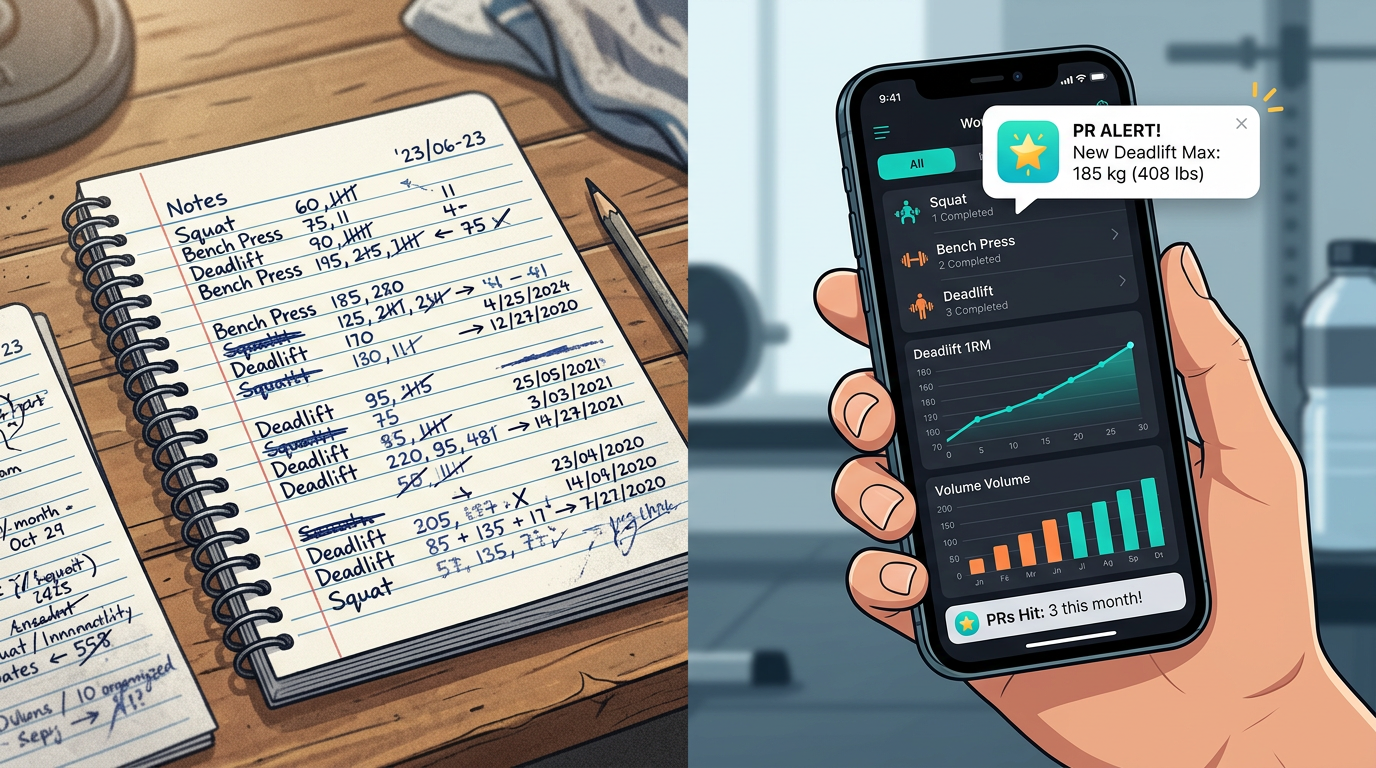
Before and after comparison showing messy workout notes in a regular notepad versus organized digital tracking in a workout app with clear progression graphs and PR notifications
Frequently Asked Questions
What is the best app to track progressive overload?
GymTrack is best for serious lifters who want automatic PR detection, projected 1RM, and AI coaching. Strong offers simpler logging with good historical data. Hevy includes social features and community programs. Boostcamp excels at pre-built training templates with automated progression.
How often should I review my progressive overload data?
Review your data every 4-6 weeks at the end of each mesocycle. Check total volume per muscle group, estimated 1RM trends, and exercises where progress stalled. Use this analysis to plan your next training block and adjust volume or exercise selection.
Do I need to track RPE for progressive overload?
Yes, RPE tells you whether adding weight is appropriate or if you're already training too close to failure. A set at RPE 7 indicates room for progression, while RPE 9-10 suggests you need more volume at current weights before increasing load.
Can I track progressive overload with just a notebook?
Yes, but notebooks lack automatic calculations and trend analysis. You need to manually calculate volume load, compare sessions by flipping pages, and spot patterns yourself. Apps handle this automatically, making it easier to identify when to add weight or deload.
What should I do if my tracked progress stalls for multiple weeks?
Take a deload week by reducing volume 40-50 percent or dropping weight 10-15 percent. If performance doesn't improve after deload, assess recovery factors like sleep and nutrition, or increase training volume if you're consistently at low RPE levels.
How do I track progressive overload when changing exercises?
Track new exercises separately from the start. You cannot directly compare back squat to front squat loads. Focus on progressing the new movement over time while maintaining core lifts across program changes for continuous long-term data.
Should I track volume load or estimated 1RM for progressive overload?
Track both. Volume load shows total work performed across all sets and indicates training stress. Estimated 1RM reveals strength capacity improvements across rep ranges. Both metrics together give a complete picture of whether you are progressively overloading.
Conclusion
Progressive overload requires systematic tracking of weight, reps, sets, and intensity across training sessions. Without logging these metrics and comparing them to previous performance, you're guessing whether your training drives adaptation.
Use workout tracking apps like GymTrack for automatic calculations and historical comparisons, or build spreadsheet systems if you prefer full control. Review your data every 4-6 weeks to identify trends, adjust programming, and confirm you're applying progressive stimulus.
How to track progressive overload comes down to consistent data entry, comparing like-for-like sessions, and using volume and intensity trends to make programming decisions. Start logging your next workout with complete data, and you'll have the information you need to keep getting stronger.
Pick a tracking method that you'll use consistently, log every working set with weight, reps, and RPE, and review your progress monthly.
Log your next session in GymTrack
Fast set logging, automatic PRs, programs with per-set targets and an AI coach that reads your history. Free on iPhone and Android.
Get the app